Last week and this week we are reading the chapter book "How to Eat Fried Worms" by Thomas Rockwell.
Here are two interactive sites that students can navigate through independently for more information about worms.
Vermi the Worm
Herman the Worm
Showing posts with label technology. Show all posts
Showing posts with label technology. Show all posts
Monday, April 23, 2012


Monday, January 30, 2012
States of Matter: Interactive Games and Videos
My class has started a science unit focuses on the states of matter and the physical properties of matter. After searching online for some resources to support our classroom materials, I've found quite a bit. Have fun exploring!
Interactive Sites for Students:
Solids Liquids and Gases
Changing States of Matter
Material Properties
Changes in Materials
The Mixtures Lab
Short Video Clips on States of Matter
States of Matter and Physical Properties
Resources for Teachers:
Standards by grade level with links to appropriate activities.
States of Matter Unit Packet
States of Matter Article and Questions
What's the Matter: Sorting into matter categories
States of Matter Worksheets
Interactive Sites for Students:
Solids Liquids and Gases
Changing States of Matter
Material Properties
Changes in Materials
The Mixtures Lab
Short Video Clips on States of Matter
States of Matter and Physical Properties
Resources for Teachers:
Standards by grade level with links to appropriate activities.
States of Matter Unit Packet
States of Matter Article and Questions
What's the Matter: Sorting into matter categories
States of Matter Worksheets
Thursday, September 29, 2011
"Dolphin Tale" Ideas and Resources
My class is very excited about the new movie "Dolphin Tale." In science, we've been discussing how scientists can use a model to help them investigate their questions and variables.
Here are a few resources I've either found or created that you can use to support reading, writing and science through ideas from the movie "Dolphin Tale."
Power Point that can be printed or shown on an Activeboard/SmartBoard
Science Worksheet to go with Scientific Method and Power Point
Writing Prompt to go with Power Point
Scholastic Resources
Winter's Tail
Hope you enjoy!
Here are a few resources I've either found or created that you can use to support reading, writing and science through ideas from the movie "Dolphin Tale."
Power Point that can be printed or shown on an Activeboard/SmartBoard
Science Worksheet to go with Scientific Method and Power Point
Writing Prompt to go with Power Point
Scholastic Resources
Winter's Tail
Hope you enjoy!
Wednesday, August 17, 2011
Math Facts: Free Interactive Game Online
I found a new-to-me website for practicing math facts. It's a basic "drill and kill" type of game, but it is simple and clearly presented. It also gives the user options of using different operations and different sum/difference totals. Check it out:
Harcourt Basic Facts
Harcourt Basic Facts
Sunday, April 10, 2011
National Geographic Website
My school is inundated with caterpillars right now. With so many natural, incidental learning experiences available, this is a perfect time to implement our life cycles unit.
National Geographic Kids has many great resources to also support this theme. Of course, in addition to bugs and butterflies National Geographic also has many other topics addressed too. Check them out!
Creature Feature: Monarch Butterflies
What in the World: Bugging Out!
National Geographic Kids has many great resources to also support this theme. Of course, in addition to bugs and butterflies National Geographic also has many other topics addressed too. Check them out!
Creature Feature: Monarch Butterflies
What in the World: Bugging Out!
Saturday, February 12, 2011
More Sea Life Resources
Since I live in South West Florida, a unit on sea life is particularly meaningful to my students and there are many opportunities to extend with real life experiences.
We have a field trip to Mote Marine Aquarium planned in March. I took my class on this particular field trip about 4 or 5 years ago. This year we are going to participate in the lesson about sea turtles and will actually get to make squid "popsicles" and then feed the turtles in the aquarium.
Of course, we also support this unit with many classroom experiences. I have found a few new resources to share:
Fern Goes for a Dive (free, animated read aloud story)
Fern Goes to Hawaii (free, animated read aloud story)
Mermaid Lullaby
Seashore Tap and Type
You can find other Sea life resources that I have gathered at this post, this post, this post and this post.
We have a field trip to Mote Marine Aquarium planned in March. I took my class on this particular field trip about 4 or 5 years ago. This year we are going to participate in the lesson about sea turtles and will actually get to make squid "popsicles" and then feed the turtles in the aquarium.
Of course, we also support this unit with many classroom experiences. I have found a few new resources to share:
Fern Goes for a Dive (free, animated read aloud story)
Fern Goes to Hawaii (free, animated read aloud story)
Mermaid Lullaby
Seashore Tap and Type
You can find other Sea life resources that I have gathered at this post, this post, this post and this post.
Sunday, December 5, 2010
Free Interactive Holiday Sites
I found this site a few years ago. It was challenging to navigate and then go back and find the activities you wanted repeatedly. They have re-organized and uploaded many free interactive boards and activities. They have many that are appropriate for December holidays. They've done a great job! It's so much easier to navigate and find activities appropriate to skill or grade level.
TES iboard player
Here's a link to a post from a few years ago too. My students still enjoy these links!
Interactive Holiday Sites
TES iboard player
Here's a link to a post from a few years ago too. My students still enjoy these links!
Interactive Holiday Sites
Friday, November 5, 2010
Monday, October 11, 2010
Free Early Literacy Activities
This site has recently been shared with me from our pre-k supervisor.
It has many, free printable activities that support literacy of infants, toddlers and pre-schoolers. They have a link for ideas for parents and another link for teachers. Check it out.
Center for Early Literacy Learning
It has many, free printable activities that support literacy of infants, toddlers and pre-schoolers. They have a link for ideas for parents and another link for teachers. Check it out.
Center for Early Literacy Learning
Friday, October 8, 2010
Monday, October 19, 2009
Pumpkin Template

Disney has a free, interactive pumpkin template.
We use this on our ActiveBoard to work on choice making, turn taking and language skills.
The vocabulary we work on using this lesson is: pumpkin, jack-o-lantern, eyes, nose, mouth, change, arrow, same, different, shape.
After each child completes a template we print them and save them for a coloring task later.
Photo courtesy Tigerlily 09 at Flickr Creative Commons
Wednesday, July 15, 2009
How to Become More Tech Savvy this Summer
I found this article through one of the CEC SmartBriefs. I thought it was worth sharing.
How to Become More Tech Savvy This Summer
How to Become More Tech Savvy This Summer
Tuesday, June 30, 2009
Word Bank and Writing Strategy
This summer I have been working with a group of kindergarten through third grade students who have autism. Several of the students have writing goals that need to be addressed and all of them have expressive language goals that need to be addressed. If you have read any of my previous posts, you know that I am a big fan of digital photos to build play skills, critical thinking skills and oral language skills.
Since I find the digital photos so beneficial, I decided to pair that strategy with a manipulative word bank in the hopes of having my students build sentences that they would copy to create a simple paragraph. My goal was that they would build one topic sentence and two detail sentences. We started with modeling and a lot of physical prompts, but I'm hoping the level of prompting will decrease.
Here's what we did:
1) I printed several photos featuring sea life from www.flickr.com.
2) Each student chose a picture that we glued to a large sheet of construction paper.
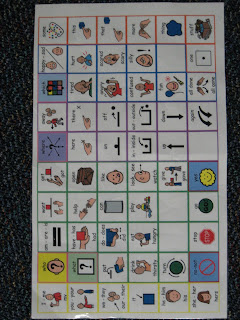
3) The students were given a file folder with a word bank targeting words that made sense with their picture. (I met with their SLP and we color coded the post its to correspond with the colors and word categories that they already use on their manual communication boards based on Gail Van Tatenhove's system.)
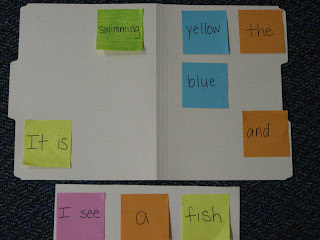
4) Then the students built a sentence by moving the post its to a sentence strip (the sentence strip is just length of file folder cut down).
5) Next the students copied their sentence on a pre-cut piece of paper. (I did this to to visually define the space of the sentence for them. This way the letter spacing and formation is confined to an area that already "looks" like a sentence. )
6) Then they glued the sentence to the piece of construction paper to which we had previously glued their photo choice.
7) We cleared off the sentence strip and started to build another sentence and repeated the steps.
Here's what our first writing samples look like:


Since I find the digital photos so beneficial, I decided to pair that strategy with a manipulative word bank in the hopes of having my students build sentences that they would copy to create a simple paragraph. My goal was that they would build one topic sentence and two detail sentences. We started with modeling and a lot of physical prompts, but I'm hoping the level of prompting will decrease.

Here's what we did:
1) I printed several photos featuring sea life from www.flickr.com.
2) Each student chose a picture that we glued to a large sheet of construction paper.
3) The students were given a file folder with a word bank targeting words that made sense with their picture. (I met with their SLP and we color coded the post its to correspond with the colors and word categories that they already use on their manual communication boards based on Gail Van Tatenhove's system.)

4) Then the students built a sentence by moving the post its to a sentence strip (the sentence strip is just length of file folder cut down).
5) Next the students copied their sentence on a pre-cut piece of paper. (I did this to to visually define the space of the sentence for them. This way the letter spacing and formation is confined to an area that already "looks" like a sentence. )
6) Then they glued the sentence to the piece of construction paper to which we had previously glued their photo choice.
7) We cleared off the sentence strip and started to build another sentence and repeated the steps.
Here's what our first writing samples look like:


Saturday, June 6, 2009
Interactive Games Sea Life and Water
Olivia of the Deep (skill: visual motor, visual perceptual)
Diego's Underwater Adventure (skill, sea life vocabulary, visual motor, multiple steps)
Diego's Tuga the Sea Turtle (skill: visual motor, classifying food/not food)
Dora's Mermaid Adventure (skill: visual motor)
Dora's Treasure Hunt (skill: visual motor)
Blue's Clues Sink or Float (skill: concept of sink or float)
Wubbzy's Underwater Adventure (skill: visual motor, harder keyboard controls)
Wonder Pets Save the Penguin or Dolphin (skill visual motor)
Wonder Pets Save the Sea Creatures (skill: visual motor)
Backyardigan's Pirate Adventure (skill: visual motor, visual perception)
Doodle Pad Explore the Seashore (skill: creativity)
Ebb and Flo Hide and Seek (skill: mouse clicks and exploration)
Ebb and Flo Spot the Differences (skill: visual perception)
Build A Fish (skill: fish habitats, creativity)
Fish Counting up to 10 (skill: number concepts)
Clifford Slide (skill: Matching colors)
Seashore Concentration (skill: visual memory)
Build A Habitat (skill: creativity and fine motor)
Barney Submarine Race (skill: visual motor)
Donald Duck Fishing (skill: color recognition and visual motor)
Little Einstein's Orchastra Ocean (skill: instrument sound recognition and matching)
CyberChase Can You Fill It (skill: exploring liquid volume)
Curious George Day at the Beach (skill: multiple steps, visual perception)
Bunnytown Pirates (skill: number order, positional concepts, visual motor)
Diego's Underwater Adventure (skill, sea life vocabulary, visual motor, multiple steps)
Diego's Tuga the Sea Turtle (skill: visual motor, classifying food/not food)
Dora's Mermaid Adventure (skill: visual motor)
Dora's Treasure Hunt (skill: visual motor)
Blue's Clues Sink or Float (skill: concept of sink or float)
Wubbzy's Underwater Adventure (skill: visual motor, harder keyboard controls)
Wonder Pets Save the Penguin or Dolphin (skill visual motor)
Wonder Pets Save the Sea Creatures (skill: visual motor)
Backyardigan's Pirate Adventure (skill: visual motor, visual perception)
Doodle Pad Explore the Seashore (skill: creativity)
Ebb and Flo Hide and Seek (skill: mouse clicks and exploration)
Ebb and Flo Spot the Differences (skill: visual perception)
Build A Fish (skill: fish habitats, creativity)
Fish Counting up to 10 (skill: number concepts)
Clifford Slide (skill: Matching colors)
Seashore Concentration (skill: visual memory)
Build A Habitat (skill: creativity and fine motor)
Barney Submarine Race (skill: visual motor)
Donald Duck Fishing (skill: color recognition and visual motor)
Little Einstein's Orchastra Ocean (skill: instrument sound recognition and matching)
CyberChase Can You Fill It (skill: exploring liquid volume)
Curious George Day at the Beach (skill: multiple steps, visual perception)
Bunnytown Pirates (skill: number order, positional concepts, visual motor)
Monday, March 30, 2009
Earth Day Games
The following is a list of free interactive games that focus on Earth Day concepts of taking care of the environment, cleaning up litter or recycling.
Clean Up Your World
Every Day is Earth Day
Clean Up the Park
Free the Beach
Dora's Mermaid Adventure
Clean Up Your World
Every Day is Earth Day
Clean Up the Park
Free the Beach
Dora's Mermaid Adventure
Friday, March 20, 2009
Free Printable Emergent Readers
On one of my yahoo groups there has recently been a thread talking about sight word readers.
There are many free resources available on the web.
Here are a few:
Carl's Corner
(Kindergarten emergent readers)
Samples from Reading A-Z
(a few free samples, for $50ish access to all of their books)
Hubbards Cupboard
(40 or so free printable books)
Make Learning Fun
(not all sight word based, but a lot of emergent themed printables)
Mrs. Meacham's
(awesome page with printables and more links)
Kinderprintables
Marcia's Lesson Links
Mrs. Jones Room
(lots of links to many other resources)
http://www.childcareland.com/free.html
(scroll through and look for "book" in the item descriptions)
http://mrskilburnkiddos.wordpress.com/reading/sight-words/
(scroll down, there are links to books she created in the middle of the post)
There are many free resources available on the web.
Here are a few:
Carl's Corner
(Kindergarten emergent readers)
Samples from Reading A-Z
(a few free samples, for $50ish access to all of their books)
Hubbards Cupboard
(40 or so free printable books)
Make Learning Fun
(not all sight word based, but a lot of emergent themed printables)
Mrs. Meacham's
(awesome page with printables and more links)
Kinderprintables
Marcia's Lesson Links
Mrs. Jones Room
(lots of links to many other resources)
http://www.childcareland.com/free.html
(scroll through and look for "book" in the item descriptions)
http://mrskilburnkiddos.wordpress.com/reading/sight-words/
(scroll down, there are links to books she created in the middle of the post)
Monday, December 15, 2008
Interactive Holiday Sites
It's the holiday time of year! We are busy learning traditions and celebrations from around the world. With this comes many natural opportunities to build language through stories, crafts and games. Since my pre-k classroom is equipped with an ActiveBoard and we have fourth grade students who earn to come down on Thursday afternoons to be our "computer buddies," my students especially love many of the interactive games that can be found for free on the internet. 
Here are a few of our class favorites:
Make Rudolph: Visual Spatial Activity
Make a Snowman: Visual Spatial Activity
Decorate a Christmas Tree
Spin the Dreidel
Shake the Snowglobe
Design a Snowflake
Kwanzaa Puzzle
Create Fireworks for Diwali
I'd love to find a child friendly Diwali, Festival of Ligths game and a Las Posadas game. If anyone knows of a link will you post it in the comments section?

Here are a few of our class favorites:
Make Rudolph: Visual Spatial Activity
Make a Snowman: Visual Spatial Activity
Decorate a Christmas Tree
Spin the Dreidel
Shake the Snowglobe
Design a Snowflake
Kwanzaa Puzzle
Create Fireworks for Diwali
I'd love to find a child friendly Diwali, Festival of Ligths game and a Las Posadas game. If anyone knows of a link will you post it in the comments section?
Sunday, August 10, 2008
Web Resources from Successful Teaching
I just love the resources listed in the Useful Ideas In and Out of the Classroom at Successful Teaching.
I especially liked:
Arcademic Skill Builders
and
Visuwords.
Both sites are new to me and look like great resources to share with the other teachers on my team and to use with students I tutor.
I especially liked:
Arcademic Skill Builders
and
Visuwords.
Both sites are new to me and look like great resources to share with the other teachers on my team and to use with students I tutor.
Thursday, August 7, 2008
Free Online Books
I've been reading more and more about Universal Design for Learning in the past few months. I found a site that was new to me, UDL Wikispace.
As I was navigating my way through all of the cool resources, I hit on one in the Literacy Tools. There are many links to help students of all ages access literacy.
I browsed several sites with free online books that were familiar to me, but it made me wonder if there were other sites and resources that were similar.
Yes! There are tons!
Here are a few that I liked:
LookyBook
TarHeel Reader
Starfall
Literactive
(You have to create an account, but it is free.)
E-Books for Young Readers
Reading A-Z Interactive Books; RAZ Kids
(Click on free samples. A subscription to the complete library is $29-$59).
Clifford Books
Magic Keys
This one would be for older kids and adults....Mark Twain, Jane Austen, Jules Verne....wow!
Read Print
As I was navigating my way through all of the cool resources, I hit on one in the Literacy Tools. There are many links to help students of all ages access literacy.
I browsed several sites with free online books that were familiar to me, but it made me wonder if there were other sites and resources that were similar.
Yes! There are tons!
Here are a few that I liked:
LookyBook
TarHeel Reader
Starfall
Literactive
(You have to create an account, but it is free.)
E-Books for Young Readers
Reading A-Z Interactive Books; RAZ Kids
(Click on free samples. A subscription to the complete library is $29-$59).
Clifford Books
Magic Keys
This one would be for older kids and adults....Mark Twain, Jane Austen, Jules Verne....wow!
Read Print
Wednesday, August 6, 2008
Interactive Books
As I am preparing for a new school year, I have been thinking about what resources and materials I use on a weekly basis that could be easily shared.
I love to use interactive books and visual supports. I find that my students attend to the lesson and remain engaged for longer periods of time when a lesson is structured in a supportive manner.
One of my all time favorite sites for interactive books and visuals is the Speech-Language-Hearing Services of Jefferson Parish Public School System.
Here are a few tips to find great printable materials from the site:
Check out the AAC button (Augmentative/Alternative Communication).
The home page of the AAC button has many interactive books that you may download for free. This page requires the user to own a Boardmaker CD.
If you don't own Boardmaker, make sure to click on the Adapted Stories button. This is a group of shared materials that can be printed directly from the website. Under the Fall tab, I have printed, laminated and velcro-ed the Going to School book. I usually use this book during the first week of school. This was the first book I printed from this site....after using it in my classroom, I was hooked. I've printed, laminated and velcro-ed many more since.
For those of you who are new to interactive books or maybe just looking for more ideas on how they are used in the classroom, check out the Photos of Activities button. This section gives a photo of the finished interactive book and other classroom materials that the teacher used with the lesson.
Also be sure to look for the Lang Activities button. This button has many, many Power Points designed to increase language skills.
I use the Power Points as a "sponge activity" when students are bathrooming and washing their hands. My classroom is set up with an Active Board (an interactive white board). I use the Power Points on my Active Board, but you could also use them with a projection screen or connect your computer to a TV.
This year I think I'm also going to try using the Power Points with our computer buddies. We have a general education 4th grade class that visits us once a week to work on the computers. My school has a student drop on our server. I'm going to try uploading the targeted Power Point to the student drop and have the 4th graders download it to the student computers. Then they can read through the power point one on one with their partner. After they finish that, they will be able to chose an online game that supports the skill. I'll let you know how it goes!
Happy exploring and navigating the site.....it is such a wealth of ideas and resources.
I love to use interactive books and visual supports. I find that my students attend to the lesson and remain engaged for longer periods of time when a lesson is structured in a supportive manner.
One of my all time favorite sites for interactive books and visuals is the Speech-Language-Hearing Services of Jefferson Parish Public School System.
Here are a few tips to find great printable materials from the site:
Check out the AAC button (Augmentative/Alternative Communication).
The home page of the AAC button has many interactive books that you may download for free. This page requires the user to own a Boardmaker CD.
If you don't own Boardmaker, make sure to click on the Adapted Stories button. This is a group of shared materials that can be printed directly from the website. Under the Fall tab, I have printed, laminated and velcro-ed the Going to School book. I usually use this book during the first week of school. This was the first book I printed from this site....after using it in my classroom, I was hooked. I've printed, laminated and velcro-ed many more since.
For those of you who are new to interactive books or maybe just looking for more ideas on how they are used in the classroom, check out the Photos of Activities button. This section gives a photo of the finished interactive book and other classroom materials that the teacher used with the lesson.
Also be sure to look for the Lang Activities button. This button has many, many Power Points designed to increase language skills.
I use the Power Points as a "sponge activity" when students are bathrooming and washing their hands. My classroom is set up with an Active Board (an interactive white board). I use the Power Points on my Active Board, but you could also use them with a projection screen or connect your computer to a TV.
This year I think I'm also going to try using the Power Points with our computer buddies. We have a general education 4th grade class that visits us once a week to work on the computers. My school has a student drop on our server. I'm going to try uploading the targeted Power Point to the student drop and have the 4th graders download it to the student computers. Then they can read through the power point one on one with their partner. After they finish that, they will be able to chose an online game that supports the skill. I'll let you know how it goes!
Happy exploring and navigating the site.....it is such a wealth of ideas and resources.
Subscribe to:
Posts (Atom)